
How to Use RCON Commands on Your The Isle: Evrima Server
This guide explains how to send RCON commands to your The Isle: Evrima server using the Custom RCON Command action, as well as how to run RCON commands automatically using Scheduled Tasks.
Sending an RCON Command
To send an RCON command manually:
- Open your The Isle: Evrima server in the game panel.
- Click the MORE button.
- Select the Custom RCON Command action.
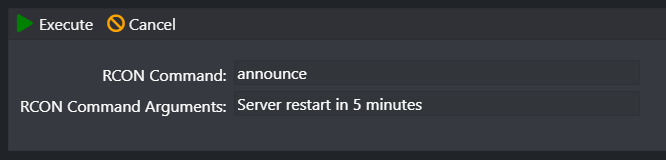
- Enter the RCON command in the RCON Command field.
- If the command requires an argument, enter it in the RCON Command Arguments field.
- If the command does not require an argument, leave the RCON Command Arguments field empty.
- Click Execute to run the command.
For example, the image below shows the announce command being used to broadcast a message to players:
RCON Command Cheat Sheet
| Command | Arguments | Example | Description |
|---|---|---|---|
announce |
Message | Server restart in 5 minutes |
Broadcasts a message to players on the server. |
directmessage |
Player and message | PlayerName Hello! |
Sends a message directly to a player. |
serverdetails |
None | serverdetails |
Returns server information. |
wipecorpses |
None | wipecorpses |
Removes corpses from the server. |
getplayables |
None | getplayables |
Returns the available playable dinosaurs. |
updateplayables |
None | updateplayables |
Updates the available playable dinosaurs. |
ban |
Player | PlayerName |
Bans a player. |
kick |
Player | PlayerName |
Kicks a player from the server. |
playerlist |
None | playerlist |
Returns the current player list. |
save |
None | save |
Saves the current server state. |
getplayerdata |
Player | PlayerName |
Returns data for a player. |
togglewhitelist |
None | togglewhitelist |
Toggles the server whitelist. |
addwhitelistid |
Player ID | PLAYER_ID |
Adds a player ID to the whitelist. |
removewhitelistid |
Player ID | PLAYER_ID |
Removes a player ID from the whitelist. |
toggleglobalchat |
None | toggleglobalchat |
Toggles global chat. |
togglehumans |
None | togglehumans |
Toggles human player access. |
toggleai |
None | toggleai |
Toggles AI. |
disableaiclasses |
AI classes | ... |
Disables selected AI classes. |
aidensity |
Value | 10 |
Changes AI density. |
getqueuestatus |
None | getqueuestatus |
Returns the current server queue status. |
toggleailearning |
None | toggleailearning |
Toggles AI learning. |
Running RCON Commands on a Schedule
You can also run RCON commands on a schedule. For example, in this example we are going to run a wipecorpses command every hour.
To do this, go to the Scheduled Tasks button and create a Custom RCON Command task.
Fill in the details similar to the image below. You can change the Repeat Every field to the interval you want the command to run.
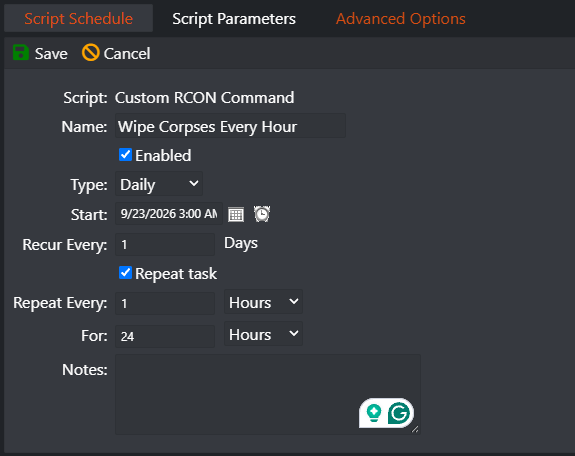
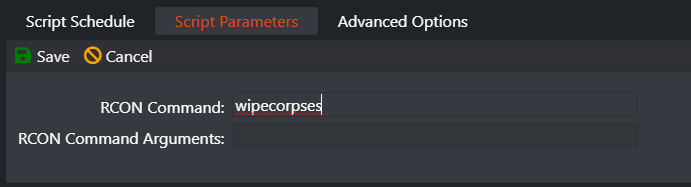
Once you have configured the schedule, switch to the Script Parameters tab at the top.
Enter the wipecorpses RCON command in the RCON Command field and leave the RCON Command Arguments field empty, as this command does not require any arguments.
Final Thoughts
The Custom RCON Command action provides an easy way to send RCON commands directly from the game panel, while Scheduled Tasks allows you to automate commands such as announcements, saves, and corpse wipes.
Remember to leave the RCON Command Arguments field empty for commands that do not require arguments.