
How to Set Up Automatic Workshop Mod Updates with In-Game Messages and Discord Notifications on Your DayZ Server
Keeping your DayZ Workshop mods up to date ensures your server remains compatible with the latest game and mod updates while reducing manual maintenance.
This guide explains how to configure automatic scheduled Workshop update checks with customizable in-game and Discord warning messages. When one or more mod updates are detected, players receive a 30-minute warning before the server is locked, connected players are kicked to help prevent item duplication issues, the Workshop mods are updated automatically, and the server is restarted.
Guide Navigation
- Important Tips
- Discord Notifications
- How to Create the Workshop Update Task
- How to Configure Update Messages and Options
Important Tips
Important Tips
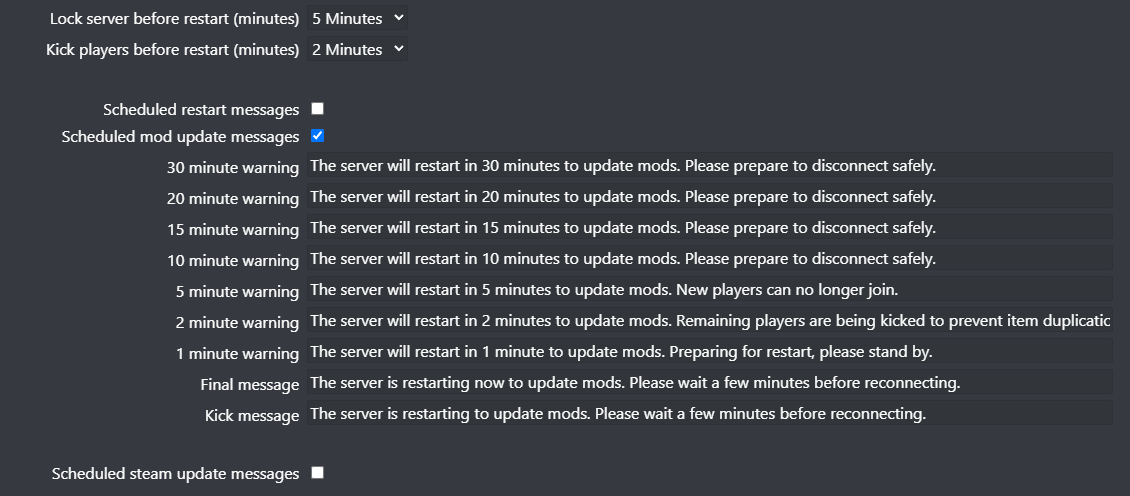
- You can change the server lock time and player kick time from the Service Settings button.
- You can customize the in-game and Discord warning messages from the Service Settings button.
- Be aware that some major mod updates may introduce changes that require you to review and update your server configuration.
Discord Notifications
You can also send Discord notifications for automatic mod updates, allowing your community to receive mod update warnings directly in your Discord server.
Follow the guide below to configure Discord notifications before enabling them for this scheduled task:
How to Create the Workshop Update Task
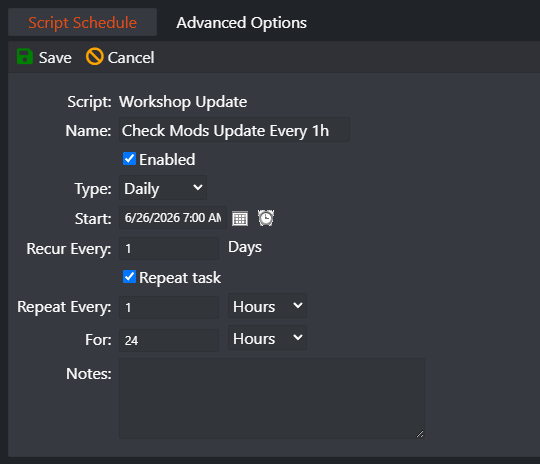
In this example, we will configure the server to check for Workshop mod updates every hour. If updates are found, the automatic update process will begin.
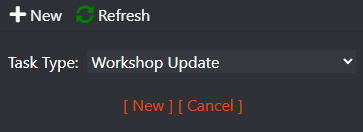
- Go to the Scheduled Tasks button.
- Select the Workshop Update task.
- Click New.
- Fill in the task details as shown in the example below.
- This example checks for Workshop mod updates every 1 hour.
- Save the scheduled task.
How to Configure Update Messages and Options
You can customize the automatic update process by changing when the server is locked, when players are kicked, and the warning messages sent in-game and to Discord.
- Go to the Service Settings button.
- Adjust the update options and customize the warning messages as required.
- Click Execute to save your changes.
Final Thoughts
Automatic Workshop update checks help keep your DayZ server running the latest versions of your installed mods while minimizing downtime. Players receive advance warning before any update takes place, allowing updates to happen with minimal disruption.
Rent a DayZ Server Today
Ready to host your own DayZ server? Deploy your server in minutes with automatic updates, scheduled tasks, full FTP access, mod support, and powerful management tools.